YouTube tags play a minimal role in discovery, mainly helping with misspellings. They shouldn't be your growth strategy, because YouTube itself gives more weight to your title, thumbnail, description, viewer behavior, and satisfaction.
The popular advice is still to paste a long keyword list into every upload. That advice belongs to an older version of YouTube, and it survives mostly because creators confuse filling in a field with improving a video. If you're asking should you use tags on YouTube, the practical answer is yes, but only as a small defensive step.
Your real optimization work belongs elsewhere: make the topic unmistakable, earn the click with honest packaging, hold attention, and give viewers a reason to keep watching. There's also a separate feature many guides lump together with ordinary tags, YouTube Shopping product tags. Those can matter for commerce because they create a direct product action rather than hidden keyword metadata.
Table of Contents
- Why the Question Deserves a Sharper Answer
- What Tags Actually Are Inside YouTube
- How YouTube's Ranking System Works
- Where Tags Help and Where They Don't
- A Minimal Tagging Workflow That Actually Works
- The Other Kind of Tags Worth Knowing About
- What Beats Tags in 2026 and Why
- The Decision Rule and What to Watch Next
Why the Question Deserves a Sharper Answer
Creators waste time on tags because tags feel controllable. You can add another phrase, another spelling, another competitor name, and leave the upload screen feeling as if you've improved the video. But a longer list doesn't repair a vague promise, a weak thumbnail, or an opening that loses viewers.
YouTube's official guidance says a video's title, thumbnail, and description are more important metadata, while tags play a minimal role in discovery and mainly help when a subject is commonly misspelled. YouTube's documentation on adding tags gives creators a much narrower job description for tags than most SEO checklists do.
The useful question isn't “How many tags should I add?” It's “What problem can a tag solve that my title, thumbnail, description, or video can't?”
The old workflow no longer fits
Early YouTube optimization culture treated tags as a central search field. Creators built extensive keyword lists, repeated close variants, and assumed that more metadata created more chances to appear. Modern YouTube guidance points toward a different model, one where metadata helps establish relevance but viewer response determines whether distribution continues.
That distinction matters. A tag may help YouTube interpret an unusual name or spelling variation, but it won't persuade someone to click. It won't make a viewer stay through the middle of a tutorial. It won't turn a poor product offer into a compelling one.
Tagging has two different meanings
Ordinary keyword tags sit behind the scenes. They can clarify a topic, brand, product phrase, or misspelling. Shopping product tags are different because they give viewers an actionable route to a product listing.
That difference should shape your upload routine. Give ordinary tags a quick, limited pass when they solve a real ambiguity. Give product tagging more attention if your video sells something, because the placement, product match, and measurement affect the commercial result.
What Tags Actually Are Inside YouTube
A YouTube tag is a creator-supplied keyword or phrase added in YouTube Studio. It isn't the title, it isn't the visible description, and it isn't the thumbnail text. Viewers generally don't see it as part of the video's public packaging.
Think of a video as a shop window. The title is the sign that tells people what's inside. The thumbnail is the display that earns attention. The description is the brochure that adds context. Tags are closer to an index card a librarian files under extra categories, useful when the main label could be misunderstood or written in several ways.
Keep the vocabulary separate
These features are easy to confuse:
- Keyword tags are hidden metadata. Use them for the core subject, legitimate variants, brand names, and meaningful misspellings.
- Hashtags are visible, clickable labels that appear in YouTube's interface. They're a separate feature and shouldn't be treated as a substitute for a clear title.
- Shopping product tags connect a video to product listings. They're commerce placements, not spelling or topic metadata.
The practical hierarchy is straightforward. First, make the subject clear in the title and description. Then make the video attractive to the right viewer through the thumbnail and promise. Use ordinary tags only where they add interpretive context that the visible packaging might miss.
A tag such as a common misspelling of a creator's unusual surname has a defensible purpose. A long list of broad phrases that already appear accurately in the title usually doesn't.
How YouTube's Ranking System Works
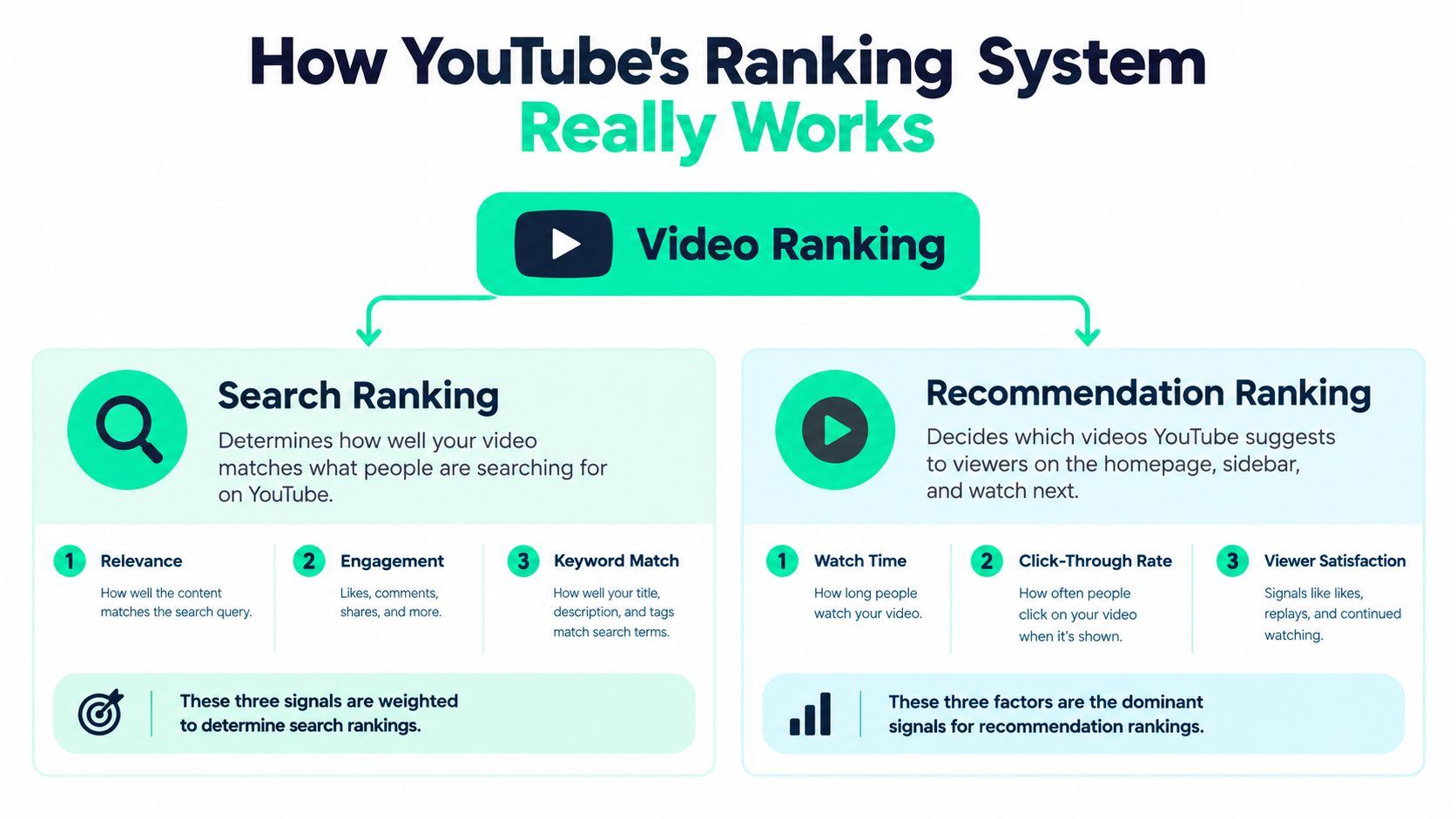
YouTube ranking starts with viewer intent, then follows viewer response. Search evaluates whether a video matches the query, while recommendations prioritize behavioral and satisfaction signals over hidden keyword fields.
YouTube describes search through relevance, engagement, and quality. Relevance covers how closely the title, description, and video content match the query. Tags contribute to that estimate, but only as one input. YouTube's search and discovery guidance also identifies recommendation signals such as watch history, search history, average view duration, average percentage viewed, likes, dislikes, and survey-based satisfaction feedback.
The practical sequence is clear:
- Match the intent. Align the topic and wording with what the viewer wants.
- Earn the click. Make the title and thumbnail promise clear and credible.
- Hold attention. Deliver value quickly and maintain momentum.
- Create satisfaction. Leave the viewer feeling that the watch was worthwhile.
Tags mainly support the first step. They can clarify an ambiguous topic, but they cannot make viewers click or keep watching.
Why averages can mislead creators
A large-scale academic analysis of online video metadata reported an average of approximately 65,125 views for YouTube videos in its dataset, while the median was 3,161 views. The gap shows how a small group of highly viewed videos can pull an average upward. YouTube's documentation on adding video tags explains the feature, but it does not establish tags as a driver of breakout performance.
That distinction matters when a creator credits tags for a sudden surge. Distribution can reflect topic demand, packaging, audience fit, retention, and satisfaction. Without a controlled comparison, the tag list offers a convenient explanation, not a dependable diagnosis.
Tags may help YouTube understand what a video could be about. Viewer behavior decides whether YouTube keeps presenting it.
Where Tags Help and Where They Don't
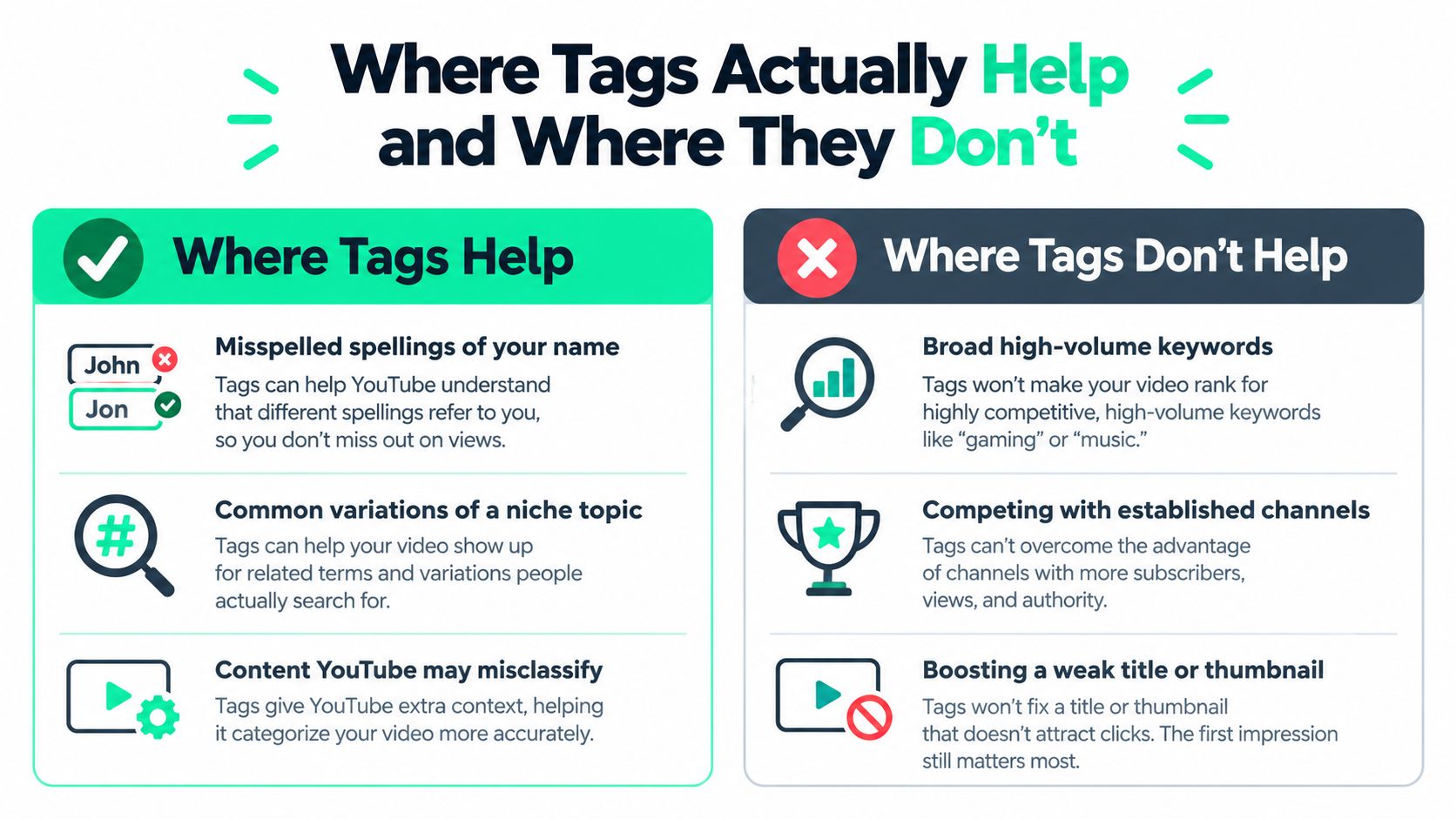
Tags earn their place when they solve a specific language problem. Filling every available field is not a strategy.
Use them for narrow cases:
- Unusual names: Add common misspellings of a creator, brand, guest, or product name.
- Inconsistent terminology: Include a legitimate alternate spelling or transliteration that viewers genuinely use.
- Technical subjects: Cover a meaningful variant when people write the topic in more than one way.
- Product phrases: Add recognizable errors in a product or collection name when fans may search for them.
Skip tags that add no context. Broad category phrases rarely need hidden support when the video already makes its subject clear. Repeating the same keyword in several forms creates busywork, not a stronger discovery signal. Competitor names and unrelated high-volume terms can confuse the subject instead of clarifying it.
The verdict by creator type
A new channel should add a few relevant tags when its name or niche has spelling ambiguity. Then put the saved time into the opening and thumbnail. Tags cannot repair unclear positioning.
An established channel can maintain a short list of brand variations and recurring topic terms. Once viewers recognize the channel, extra generic phrases deliver little value.
A niche expert may benefit from alternate technical language, especially when a concept has competing spellings. Use the wording people write, not every expansion suggested by a keyword tool.
A merch-driven creator must separate ordinary keyword tags from Shopping product tags. Keyword tags can catch a misspelled creator or product name. Shopping product tags can give viewers a direct route to the item, so they belong to the commerce workflow rather than the metadata cleanup routine.
If spoken wording needs review before publishing, using iScribe Live Transcribe can help you inspect the terms your audience hears and repeats. The practical rule is simple: use ordinary tags to clarify ambiguous language, and use product tags to connect eligible content with merchandise. Spend the rest of your effort on the parts viewers can see and respond to.
A Minimal Tagging Workflow That Actually Works
Treat tags as a short quality-control task, not an SEO campaign. Start with the video's central topic, then ask whether any meaningful variation could cause YouTube or viewers to misunderstand it.
Use this sequence:
- Write the core topic. Choose the phrase that accurately describes the video.
- Add legitimate variants. Include an alternate wording only if it represents the same subject.
- Protect the brand term. Add the creator, channel, guest, or product name.
- Add misspellings selectively. Include errors people genuinely make, especially for unusual names and transliterations.
- Remove keyword clutter. Delete broad phrases, duplicates, and terms that don't describe the actual video.
Consider a hypothetical creator launching a hoodie collection called “Kairo Club.” A sensible tag set might include the creator's name, “Kairo Club,” a genuine alternate spelling, and a common misspelling of “Kairo.” It would not include every clothing term, every streetwear phrase, or unrelated searches for large apparel brands.

Every tag should answer this question: would an alternative spelling or closely related version still mean my video?
If the answer is no, remove it. Don't invent a fixed quota, and don't confuse a full field with a well-optimized upload. Creators publishing music content can also browse YouTube tips for music videos while refining titles, descriptions, and audience intent.
The Other Kind of Tags Worth Knowing About
Most discussions of YouTube tags stop at hidden keywords. That misses the more commercially relevant feature: YouTube Shopping product tags.
An ordinary keyword tag helps describe a video behind the scenes. A Shopping product tag creates an in-video commerce surface that can connect the viewer to a product listing. The viewer isn't merely receiving a stronger metadata signal. They're being given a direct action tied to something shown or discussed in the content.
A YouTube Help community announcement reported that an internal July 2026 experiment found videos using Shopping product tags alone generated more than 110% more product clicks than videos relying on description links alone. The YouTube Help announcement presents that result as a click-through benchmark, not a guaranteed sales lift.
Clicks are not conversions
A product tag can reduce friction, but it can't fix every commercial weakness. Orders still depend on product-market fit, price, creative prominence, landing-page speed, inventory, checkout, and the viewer's willingness to buy.
For a creator promoting apparel, tag the specific garment demonstrated in the video. If the video shows a new drop, place the product association close to the relevant moment and make the item easy to identify. Track product clicks, orders, and estimated revenue, not views alone.
This is also why a creator's broader storefront strategy matters. A link-in-bio page can organize multiple destinations, while an in-video product tag can connect a particular moment to a particular item. The two tools solve different navigation problems, as the guidance on link-in-bio pages for YouTube illustrates.
Manual keyword work should never crowd out a relevant product placement. If you sell merchandise, ordinary tags are the minor hygiene task. Shopping tags are the feature that deserves a real test.
What Beats Tags in 2026 and Why
Creators should reinvest saved tagging time into the parts of the upload that shape both interpretation and action. Titles, thumbnails, descriptions, and chapter timestamps each have a clearer job than a long keyword list.
| Metadata lever | What it influences | When it beats tags |
|---|---|---|
| Title | Query relevance and click intent | When the topic needs to be understood immediately |
| Thumbnail | Visual attention and expectation | When the video needs to stand out in a crowded feed |
| Description | Context, supporting language, and useful details | When viewers and systems need a fuller explanation |
| Chapter timestamps | Navigation and access to specific moments | When long-form viewers need structure |
| Shopping product tags | Direct product discovery and action | When the video demonstrates or discusses an item |
A strong title says what the viewer will get without making them decode a clever phrase. A thumbnail creates one clear visual idea, not a wall of text. A description uses natural language to explain the subject, supporting details, and relevant links. Chapters help viewers move through substantial videos and find the section that matches their intent.
If you're reviewing broader tactics for boosting views for video projects, keep tags in their proper place. They're the final polish after the packaging and viewer experience are sound, not the foundation of the upload.
For creators building income beyond advertising, the same principle applies to YouTube creator monetization. A clearer offer, better audience fit, and lower buying friction matter more than a crowded keyword field.
The Decision Rule and What to Watch Next
Use this rule: tag a phrase if it captures a real misspelling, an unusual name, or a meaningful alternate term. Otherwise, spend the time on packaging, retention, or relevant Shopping product tags.
Your final upload check can be short:
- Is the title accurate and specific?
- Does the thumbnail make the promise obvious?
- Does the opening deliver on that promise quickly?
- Does the description clarify the topic?
- Are tags limited to useful variants and misspellings?
- If you sell something, is the demonstrated product tagged and measurable?
YouTube also documents auto-tagging for eligible Shopping creators, which makes manual keyword optimization even less central and creates a new quality-control task. Review automated product associations for accuracy rather than assuming every suggested match is commercially appropriate.
Be cautious with tag-driven success stories too. The average and median view figures described earlier show why aggregate performance can be heavily skewed by a small number of highly viewed videos. Use controlled comparisons and track the signals that matter, not anecdotes about a keyword list.
Creators who sell merchandise should learn how to sell merch on YouTube as a commerce workflow, not as an extension of ordinary SEO.
FLYP LTD helps creators turn attention into merch revenue through AI-generated drops, zero-inventory production, link-in-bio storefronts, and native YouTube Shopping product tagging. If you want to connect the product shown in a video to a smoother buying journey, visit FLYP LTD and explore the creator merch workflow.