Nearly every U.S. hiring decision-maker treats recognition as essential. In 2025, 99% of them said recognizing employees for their work was important, in an Express Employment Professionals–Harris Poll survey of 1,000 hiring decision-makers. Intent that high still fails when the only tool is a compliment inbox. An employee appreciation form should store how often someone wants thanks, whether it can be public, and which reward they will use. Generic praise and identical gifts miss that record. I would treat the form as a preference and equity file first, and as a nomination only when a specific act needs a manager or a budget.
Table of Contents
- Choose the Right Employee Appreciation Form
- Fields Every Appreciation Form Should Capture
- Copy-Ready Blank Form Templates
- Filled Nomination and Thank-You Examples
- Recognition Frequency and Reward Choices
- How the Forms Connect in One Program
- Build, Test and Pilot the Form Before Launch
- Measure Who Is Missing and What Is Working
Choose the Right Employee Appreciation Form
Many teams already believe recognition matters. Few have a system that can prove it. In a Gallup and Workhuman study of more than 7,000 full-time and part-time U.S. workers, only 23% strongly agreed their organization had a system for professional milestones such as promotions and work anniversaries. Just 15% strongly agreed there was a system for birthdays, weddings, or other life events. Only 20% strongly agreed that someone at work had asked how they preferred to be recognized.
That gap is why one document that tries to do every job fails. Pick the form from the trigger, not from a template gallery.
| Form | Use it when | Capture at minimum | Owner | Output |
|---|---|---|---|---|
| Peer nomination | A colleague's specific act should be recorded | Recipient, nominator or anonymous, behavior, value, impact, channel | Peer | Manager review, then private or team thanks |
| Manager acknowledgment | A recent contribution needs timely praise | Recipient, date, behavior, impact, visibility consent | Direct manager | Note in a one-to-one or team channel |
| Service and life milestone | Anniversary, promotion, onboarding, or personal occasion | Employee, event, date, preference, consent | HR or People Ops | Scheduled message and optional reward |
| Recognition preference | You need to know how someone wants thanks | Frequency, visibility, reward choice, access notes | Employee | Profile later forms must respect |
| Pulse thank-you note | Weekly thanks with no prize attached | Recipient, one specific sentence, channel | Anyone | Message only, no approval queue |
| Formal award nomination | A funded award has rules and an approver | Peer fields plus award type, eligibility, approver | Nominator, then HR | Approve, decline, or defer |
How each row earns its place
Peer nomination is the record of a seen act. The peer owns the facts. A manager owns the decision to share them.
Manager acknowledgment is the timely note. It should land while the work is still fresh, not at quarter close.
Service and life milestone is a calendar, not a compliment. People Ops owns the date, the stored preference, and consent. The message goes out because the date arrived.
Recognition preference is filled by the employee before any gift is chosen. Frequency, visibility, and reward choice live here so later forms cannot invent them.
Pulse thank-you is one specific sentence and a channel. Anyone can send it. There is no prize and no queue.
Formal award nomination is the only row that spends money. It adds award type, eligibility, and a named approver, then ends as approve, decline, or defer.
Run one weekly form (the pulse note) and one milestone form. Add peer and award paths only when a record or a budget is required. A single mega-form trains people to skip fields, and skipped fields are how public callouts and useless gifts get through.
Fields Every Appreciation Form Should Capture
Six forms stay comparable only if they share one schema. Free-text praise cannot be audited. Structured fields can.
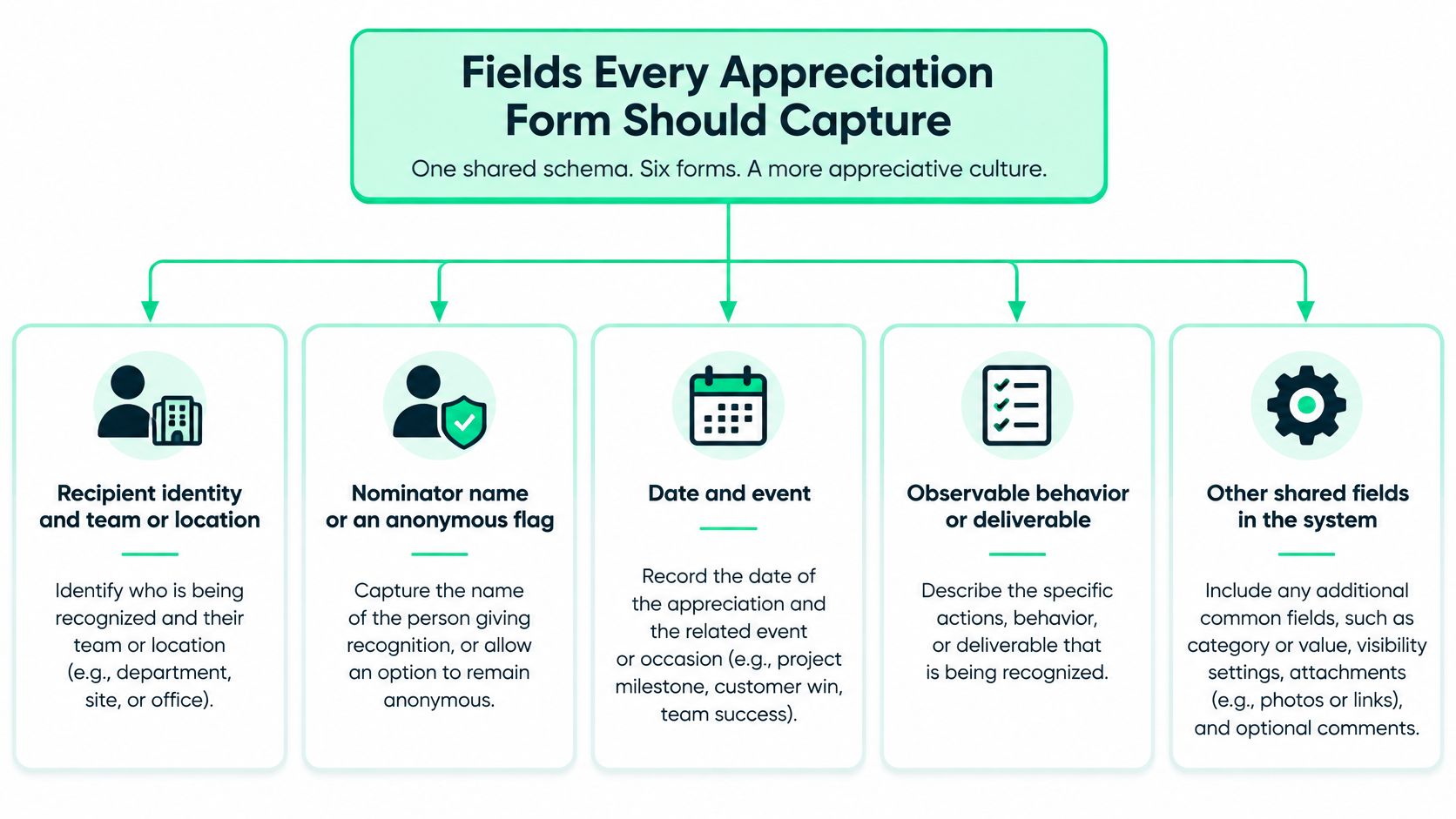
Gallup's guidance on low-cost recognition describes effective recognition as honest, authentic, individualized, timely, and aligned with organizational values, and it recommends recognition about every seven days so a recent contribution still feels current. The form is how you make that standard repeatable.
The shared dictionary
Use one running case so reviewers learn the pass test. Jordan Lee, People Ops, Austin, rebuilt the onboarding checklist before the Friday cohort, showed Ownership, and cut repeat questions in that cohort. Consent stays on the team channel. Status is Submitted.
| Field | Required | What good looks like | Example |
|---|---|---|---|
| Recipient and team | Yes | Employee ID or name plus team and site | Jordan Lee, People Ops, Austin |
| Nominator or anonymous | Yes | Named person or a true anonymous peer flag | Anonymous peer |
| Date and event | Yes | When the contribution happened | 12 March 2026, cohort launch |
| Observable behavior | Yes | A seen act or deliverable, not a trait | Rebuilt the onboarding checklist before Friday |
| Organizational value | Yes | A value the company already publishes | Ownership |
| Impact | Yes | Effect on a person, customer, or result | Fewer new-hire questions in that cohort |
| Recognition channel | Yes | Private, team, public, award, or development | Team mention |
| Visibility consent | Yes before any public use | Explicit yes or no to wider naming | No public posts |
| Reward preference | No | Chosen reward, size, region, or none | Employee-choice item, size M, EU ship-to |
| Review status | Yes for awards | Draft, submitted, approved, or declined | Submitted |
Behavior is the writing test. "Great teammate" fails. A dated deliverable passes. If a colleague could not have watched it or opened the file, it is a personality label, and the form should reject it.
Visibility consent is required before any wider post. Optional fields cover reward preference, cultural or accessibility notes, and a short narrative. Do not make the narrative do the work of the structured lines.
What sits outside the form
A written recognition policy should still define eligibility, award types, presentation frequency, measured goals, funding, and review. Those rules govern the form. They do not belong in every pulse note.
Route peer praise so it can publish after consent. Route formal rewards so they wait for approval. Export four audit fields on demand: submission time, reviewer, decision, and the channel used. If the channel used is not the channel consented, the program is already unfair, no matter how warm the wording was.
Copy-Ready Blank Form Templates
Paste each block into your form tool as one prompt per line. Help text states the pass test and the limit. Nominations cap at 120 words. Pulse notes cap at 40 to 70 words.
Peer nomination
- Recipient name and team. Full name plus team and site. 80 characters.
- Nominator name or Anonymous peer. A real name, or the anonymous flag, never both. 60 characters.
- Date the act happened. The day of the work, not the day you remembered it.
- Observable behavior. Something a colleague could have seen. 400 characters.
- Organizational value. Pick from the published list only.
- Business or colleague impact. Who was helped, or what result moved. 300 characters.
- Channel. Private, team, public, award, or development.
- Visibility consent. Yes or no to naming beyond that channel.
- Submit. Sends to the manager. It does not publish.
Manager acknowledgment
Same prompts as the peer form, without nominator. Add Peer nomination ID when you are citing one. Help text: confirm the date is inside the past week and re-check consent before you post.
Pulse thank-you
Recipient. One specific sentence. Channel. Submit. No approval step. Help text: name the act and the day. If you need a prize, stop and open the award form instead.
Service and life milestone
Employee. Event type (anniversary, promotion, onboarding checkpoint, or personal occasion). Event date. Stored preference. Consent. Optional reward. Help text: do not write a new compliment. Pull the preference already on file.
Recognition preference
Frequency (weekly, monthly, quarterly, semiannually, or annually). Visibility (private, team, public). Reward choices (cash, paid time off, gift card, employee-choice item, or none). Access or cultural notes. Save. Help text: "none" is a valid reward. Notes cover sizing, religion, language, and shift limits, 200 characters.
Formal award nomination
All peer prompts, plus award type, eligibility confirmation (yes or no against the written rule), funding category, and approver name. Help text: an empty approver blocks submit. A no on eligibility blocks submit.
Filled Nomination and Thank-You Examples
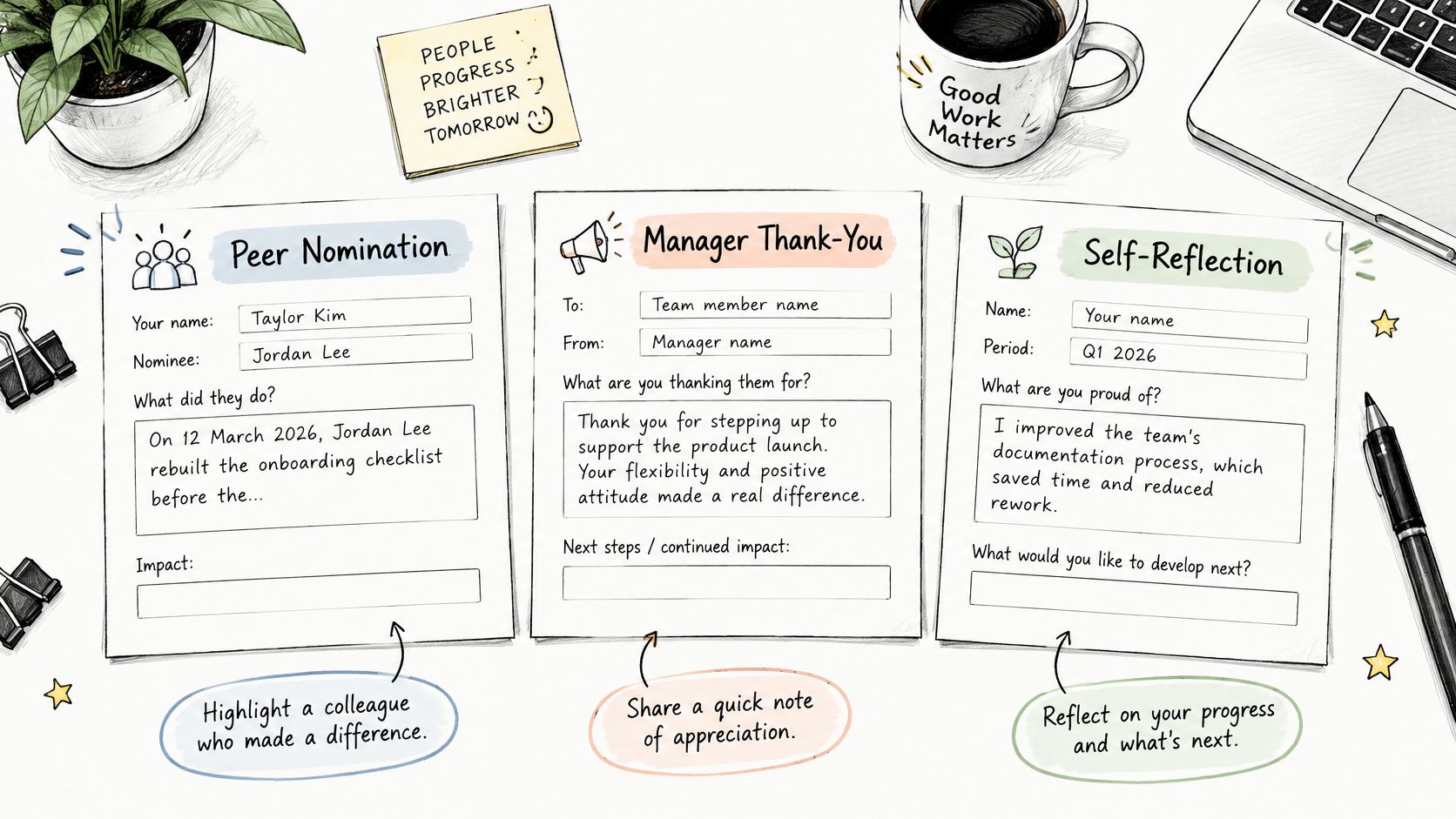
A blank prompt list still leaves writers guessing. These three samples are ready to adapt, and each one puts a channel and a consent decision beside the praise, so the entry doubles as a record of how that person wants to be recognized. The photo below is the paper version of the same idea: separate sheets, not one crowded page.
Three samples that pass
Peer nomination. On 12 March 2026, Jordan Lee rebuilt the onboarding checklist before the Friday cohort. That showed Ownership. New hires in that group asked fewer repeat questions. Please thank Jordan in the team channel only. I am submitting as an anonymous peer. No award requested.
Manager acknowledgment, inside a week. Priya Shah closed the vendor gap on 4 March so the Lisbon offsite still had printed badges. Impact was a same-day save for 80 attendees. Value: reliability. Visibility: private note in our one-to-one, because her preference record says no public callout.
Pulse thank-you, no approval path. Thanks, Mateo, for covering the late APAC standup on 2 April and sending the recap before London logged on. That kept the handoff intact.
Read the three side by side and the pattern is clear. The peer picks a channel and declines an award. The manager defers to a stored preference instead of posting publicly. The pulse skips approval because it asks for nothing beyond the thank-you. The praise is the payload, but the visibility and reward lines are what make each entry usable when you audit the program later.
Tone for a client or partner note is a different job. If you need that voice, find festive messages for business partners and keep those lines off the employee form. For internal wording that stays specific, the employee recognition messages examples are the closer match.
Watch a short walkthrough of how a specific thank-you is built, then come back to the weak sample.
The version that fails
Jordan is a rockstar and always goes above and beyond.
No date. No behavior. No impact. No channel. A reviewer cannot check it, and a colleague cannot learn from it. It is also too vague and too short to pass. Keep pulse notes inside 40 to 70 words and nominations inside 120 words so a manager can scan a queue.
Swap rule: keep the structure. Replace only the name, date, act, value, and channel. If you cannot fill those five, you do not have a nomination yet.
Recognition Frequency and Reward Choices
Most templates ask who and why. They skip how often, how publicly, and in what form. That is the design gap.
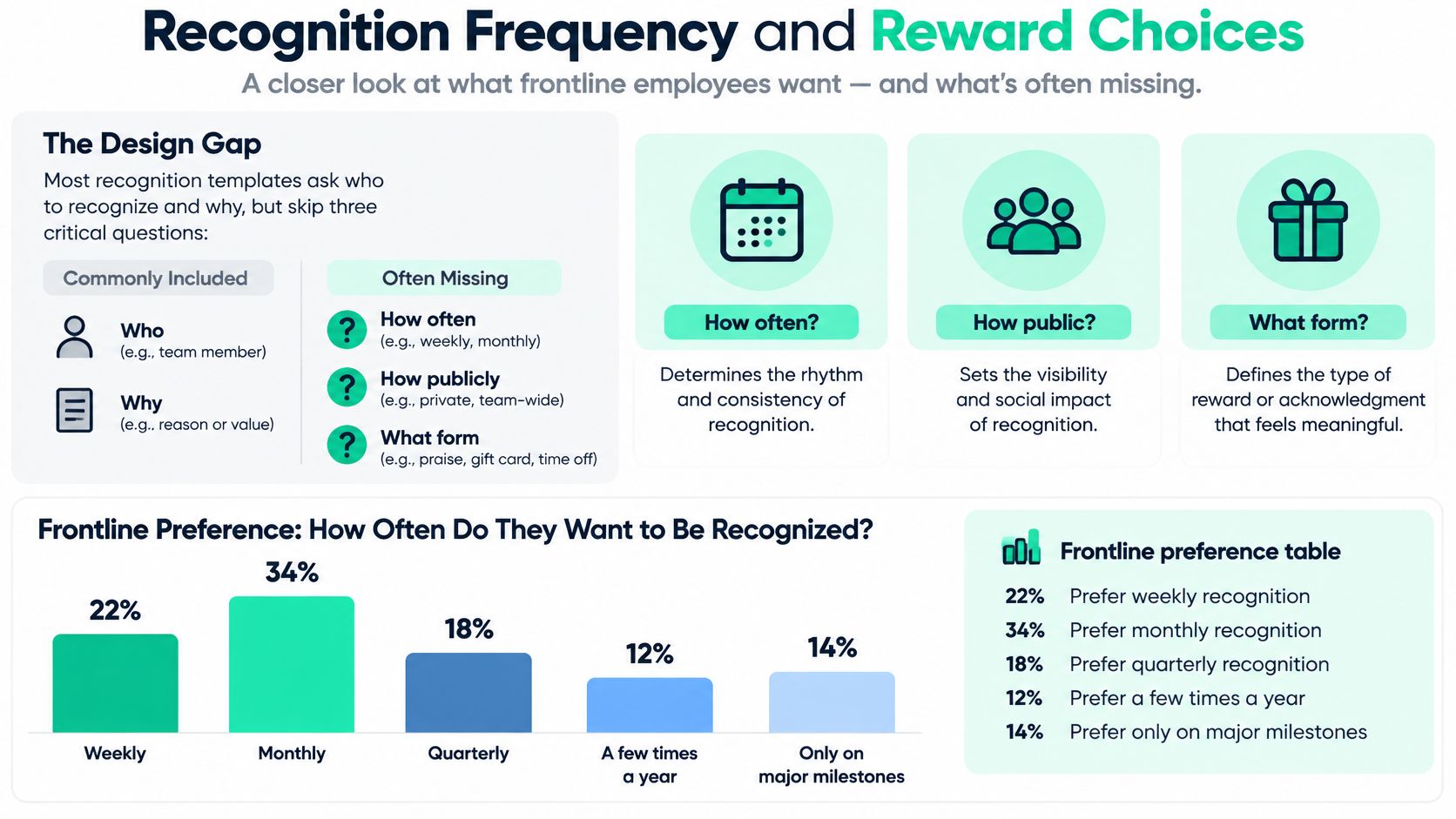
A UKG global study of the frontline workforce shows the split. 22% of frontline employees prefer weekly recognition, 34% monthly, 23% quarterly, and 17% semiannually or annually. Preferred rewards in that same research lead with cash bonuses (66%), paid time off (55%), and gift cards (42%).
| Preference | Share of frontline employees |
|---|---|
| Weekly recognition | 22% |
| Monthly recognition | 34% |
| Quarterly recognition | 23% |
| Semiannually or annually | 17% |
| Cash bonus as a reward | 66% |
| Paid time off as a reward | 55% |
| Gift card as a reward | 42% |
Fields that stop a bad default
Use a single-select frequency, a visibility choice, an optional reward list that includes none, and one free-text line for cultural, religious, sizing, or accessibility limits. More recognition is not automatically better. Public praise against a private preference, or a gift the person cannot use, reads as performance, not thanks.
Map cadence to the lightest form that fits. Weekly maps to a pulse note. Monthly maps to a manager acknowledgment. Quarterly and yearly map to a nomination or milestone window, not to a weekly blast.
Choice instead of a clone gift
If merch is on the list, the person picks the item, the size, and the region, or a non-merch alternative. Identical branded gifts fail people who do not wear that cut, cannot receive that ship-to, or asked for time off instead. For how outcome and choice should line up, a leader's guide to outcome-based rewards is a useful companion, and the corporate recognition gifts notes cover what to offer once the preference exists.
Store the preference before the first award cycle. Let it override a manager's default channel. A stored "private only" beats a cheerful all-hands plan every time.
How the Forms Connect in One Program
The preference record is read by every other form. A peer nomination may suggest a channel. A stored "private only" choice blocks a public post. Life-event milestones stay off public channels unless the preference and a fresh consent both say yes.
Pulse notes never open an award, never change review status, and never spend budget. If the sentence describes award-level impact, point the sender to the formal nomination. Do not upgrade the pulse in place.
A manager acknowledgment can cite a peer nomination as evidence. It still needs its own date and its own visibility check. Anonymous peer entries can feed that note. They cannot be quoted with the nominator's name, and they stay off any leaderboard.
The milestone form does not ask for a new compliment. It pulls the preference, confirms consent, and sends the message on the anniversary, promotion, or onboarding date. Formal awards are the only path that checks eligibility, funding, and an approver.
Three handoffs that break trust
- Award form for a weekly thanks. You built a queue for a sentence. People stop submitting.
- Gift email before a preference exists. You ordered blind. Returns and unused kits follow.
- Private note copied into the company feed because the nomination sounded warm. Consent was the rule, not the compliment.
Practical rule: Preference first, pulse weekly, manager note monthly, nomination when budget or a record is needed, milestone on the calendar.
If a field name is fuzzy, go back to the dictionary rather than inventing a seventh form. Programs that stay coherent look like the patterns in these employee recognition program examples: one owner per path, one output per path.
Build, Test and Pilot the Form Before Launch
A pretty template that leaks names, or that a screen reader cannot finish, will undo a sincere thank-you. Set governance before you open the form.
Limit purpose to recognition. Name the retention period. Use role-based access, audit logging, and a real export and delete path. Store personal identifiers apart from recognition text. Record consent for public attribution. Keep an immutable submitted-at timestamp plus review history. Anonymous peer submissions stay anonymous in every export a manager can open.
Accessibility checks before any pilot
The VA form accessibility guidelines map cleanly onto WCAG 2.2 Level AA: 1.3.1 for programmatic relationships, 3.3.2 for labels or instructions, and 3.3.3 for error suggestions. Every input needs a programmatic label. Errors must name the field and say how to fix it. Use keyboard-operable controls, visible focus, and text errors. Color alone is not an error state. Describe optionality, character limits, and confidentiality in text, not only in placeholder gray.
Six tests, in order
- Screen reader. Read every label, hint, and error aloud.
- Keyboard only. Complete the form with visible focus and no mouse.
- Phone layout. Labels must not collide with the keyboard.
- Duplicate submit. A second click is blocked, not doubled.
- Authorization. A peer signed in cannot edit an HR-only award field.
- Two regions. Local name order, date format, language, and privacy wording all change, and the form still validates.
Before that pilot, frequency and reward choice, including none, are already stored. No gift is ordered blind.
Launch in sequence. Pilot one team and one non-headquarters site for two weeks. Read ten submissions against the specific-behavior test. Fix the form. Then open it company-wide. Pulse notes cannot trigger awards. Public posting is blocked when consent is no.
If the pilot shows people wanted only a private note, send the note and skip the gift.
Measure Who Is Missing and What Is Working
A form that only headquarters can finish will report a happy headquarters. Recent five-country research from O.C. Tanner's 2025 recognition report found that nearly 61% of employees use digital recognition platforms, but employees with limited technology access are 57% less likely to believe recognition is equally accessible and 46% more likely to view it as an empty gesture. Separate 2025 research in that same release found only 23% of employees feel meaningfully recognized, even though 90% believe recognition would improve productivity and 91% say they would exert more effort if their contributions were valued.
Offer mobile, offline or paper, manager-assisted, and multilingual submission. Store role, location, shift, and employment type for disparity checks. Do not collect extra sensitive detail to "explain" a gap you can already see.
| Metric | What to count | Warning sign |
|---|---|---|
| Submission volume | Forms per team per month | One team files nearly every nomination |
| Time to recognition | Days from contribution date to delivery | Median beyond 14 days versus a one-week aim |
| Participation mix | Share by role, site, shift, employment type | Headquarters far above frontline or night shift |
| Approval rate | Approved awards divided by formal nominations | One manager approves almost every award |
| Channel mix | Private, team, public, and award counts | Public posts despite private preferences |
| Concentration | Repeat recipients in a cycle | The same visible roles every month |
Merch orders and raw volume are not engagement. A busy inbox can mean one charismatic team and a silent night shift. Pair form outcomes with tracking eNPS and employee turnover so you are not congratulating yourself on submission counts while regretted exits climb. Regional fulfillment reporting answers a narrower question: did rewards reach the same groups that submitted, or only the site nearest the warehouse?
Monthly review, in this order
- Export counts by team, site, shift, and employment type.
- Flag any group absent for two cycles.
- Compare public posts with consent and preference records.
- Sample ten nominations for a specific behavior and an impact line.
- Send gaps to the form owner. Do not answer a missing group with a company-wide praise blast.
I would rather ship ten private notes that match stored choices than a hundred public posts that ignore them.
FLYP LTD runs global merch as a managed service for People teams, including employee-choice stores, recognition moments, and onboarding kits with curation, QA, logistics, and reporting handled end to end. If your appreciation form already stores size, region, and a non-merch alternative, that record can drive fulfillment instead of another identical gift drop. Visit FLYP LTD when you are ready to connect preference data to rewards people will use.