Metadata tags are minor search tools, while Shopping tags directly impact sales. YouTube allows up to 60 product tags per video, and its published research says Shopping tags generated more than twice as many product clicks as description links.
Most advice about how to use tags on YouTube is stuck in the keyword-stuffing era. Creators copy their title into the Tags field, add broad phrases, and expect rankings to improve. That isn't how YouTube describes the feature, and it wastes time that should go into the title, thumbnail, opening, and viewer experience.
There are two separate systems. Metadata tags help YouTube interpret ambiguous terms and common misspellings. Shopping tags connect viewers with purchasable products and create measurable events such as product clicks and attributed sales. Treating them as interchangeable is the fastest way to build a weak tagging process.
Table of Contents
- The Tag Myth Most Creators Still Believe
- Where to Find and Edit Video Tags in YouTube Studio
- How to Build Tags That Actually Help Discovery
- Product Tags Versus Metadata Tags, What Creators Need to Know
- Measuring Tag Performance and What to Optimize Next
The Tag Myth Most Creators Still Believe
More tags do not create more discovery. YouTube gives the metadata Tags field a narrow job: helping interpret names or phrases that viewers may misspell. Its own YouTube's tagging guidance places greater weight on titles, thumbnails, and descriptions.
Build tags as a small clarification layer, not a keyword warehouse. For a video about a branded hoodie, add the exact collection name, a recognized abbreviation, and a likely misspelling. Skip broad terms such as “fashion,” “business,” or “viral” unless the video genuinely covers them. Irrelevant tags add clutter without giving the video a meaningful discovery advantage.

Two tag systems, two jobs
Metadata tags support YouTube's interpretation of the video. They do not create a product listing, checkout path, commission event, or direct merchandise connection.
Shopping tags connect eligible creators' products to long-form videos, Shorts, and livestreams. They place merchandise within the viewing experience, giving viewers a direct route to product pages instead of requiring them to remember an external URL. YouTube says Shopping Analytics can show engagement with tagged products and the share of traffic coming from product pages. Its published research reports that Shopping tags generated more than twice as many product clicks as links in video descriptions.
Practical rule: Use metadata tags to resolve ambiguity. Use Shopping tags to create and measure a buying path.
Keep that distinction clear when reviewing this guide to whether YouTube tags still matter. If a team plans to apply product tags across several channels, settle account access and verification first. The guides for multi-account verification can help clarify the required workflow before tagging operations expand.
Where to Find and Edit Video Tags in YouTube Studio
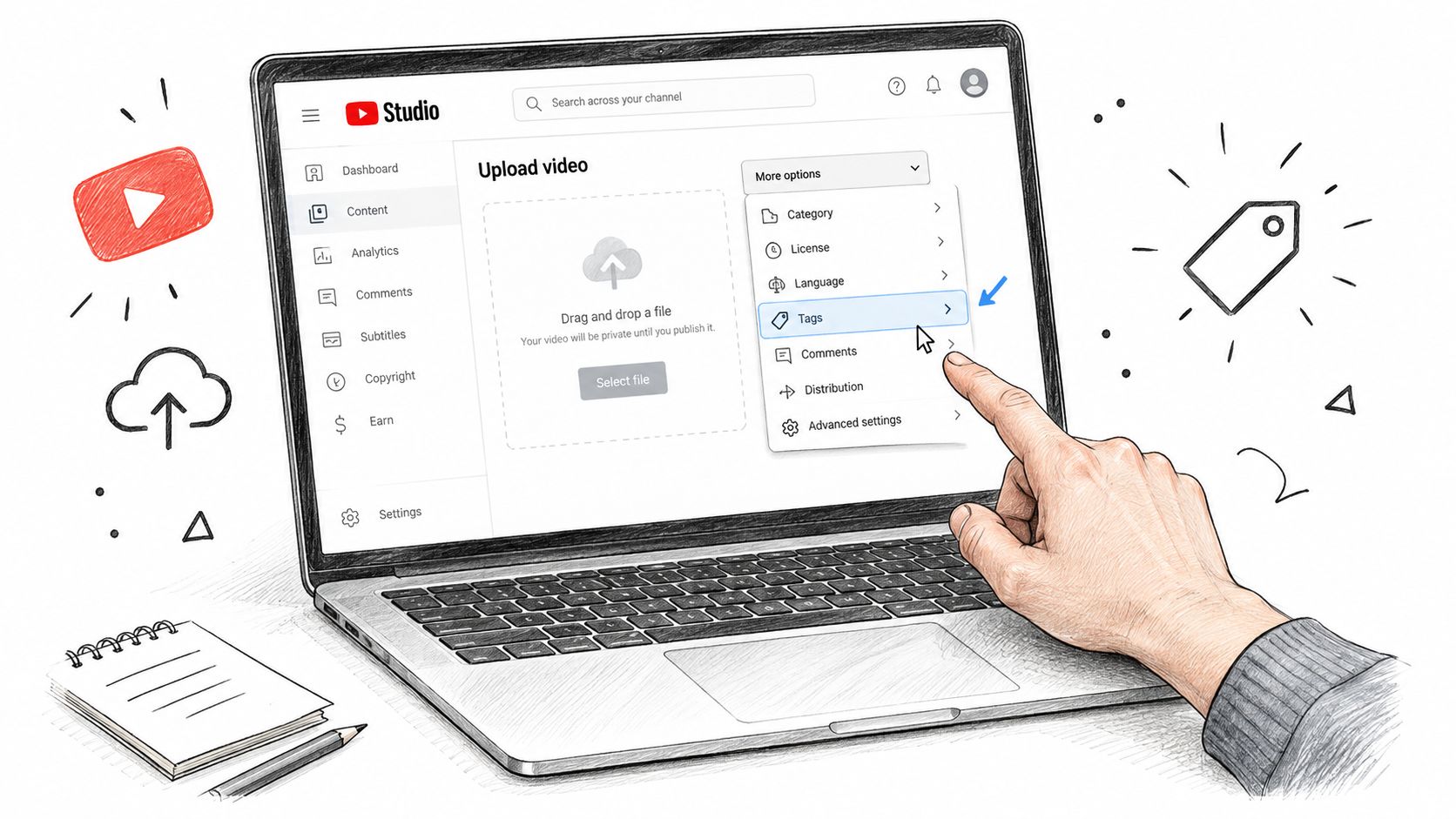
YouTube hides metadata tags in the expanded upload settings, which is why many creators miss them. The field is available, but it isn't presented as a primary optimization control.
Add tags to a new upload
During a desktop upload, move through the normal video details screen. After entering the title and description:
- Open More options.
- Find the Tags field.
- Enter relevant phrases separated by commas.
- Review the list before continuing through the upload flow.
- Save or publish the video after checking the remaining settings.
The field belongs to the video's metadata, not its product catalog. Adding a product name here won't make the item shoppable, and adding a product through Shopping won't replace the need for accurate video metadata.
Edit tags on an existing video
For a published upload, open YouTube Studio and use the left navigation:
- Select Content.
- Choose the video you want to update.
- Open the video details page.
- Select Show more.
- Locate the Tags field.
- Edit the entries and save the changes.
Refresh the settings page if you want to confirm that the update persisted. Don't confuse the Tags field with the title, description, hashtags, or product-tagging controls. Each serves a different purpose, and changing one doesn't automatically update the others.
Mobile upload screens can place product controls and metadata controls in different parts of the flow. If you're publishing from a phone, look for Tag products when you need a shoppable association, rather than assuming the ordinary Tags field performs the same job. Teams coordinating launch comments, publishing schedules, and audience replies can also use community management around video launches to keep the release process consistent.
How to Build Tags That Actually Help Discovery
A useful tag list starts with the video's real subject, not with a list of phrases you hope will attract traffic. Build it in three passes, then delete anything that doesn't survive a relevance check.
Pass one, name the exact subject
Start with the primary topic in the clearest natural wording. If a creator publishes a video showing a specific garment called “Orbit Heavyweight Hoodie,” the first tag should reflect that product or collection name. Add close phrase variants only when viewers could reasonably use them.
For example, a focused starting set might include:
- Exact product name: Orbit Heavyweight Hoodie
- Natural variant: Orbit hoodie
- Collection phrase: Orbit merch drop
Don't begin with a broad category such as “fashion.” A broad word can describe thousands of videos and won't clarify the specific subject of this upload.
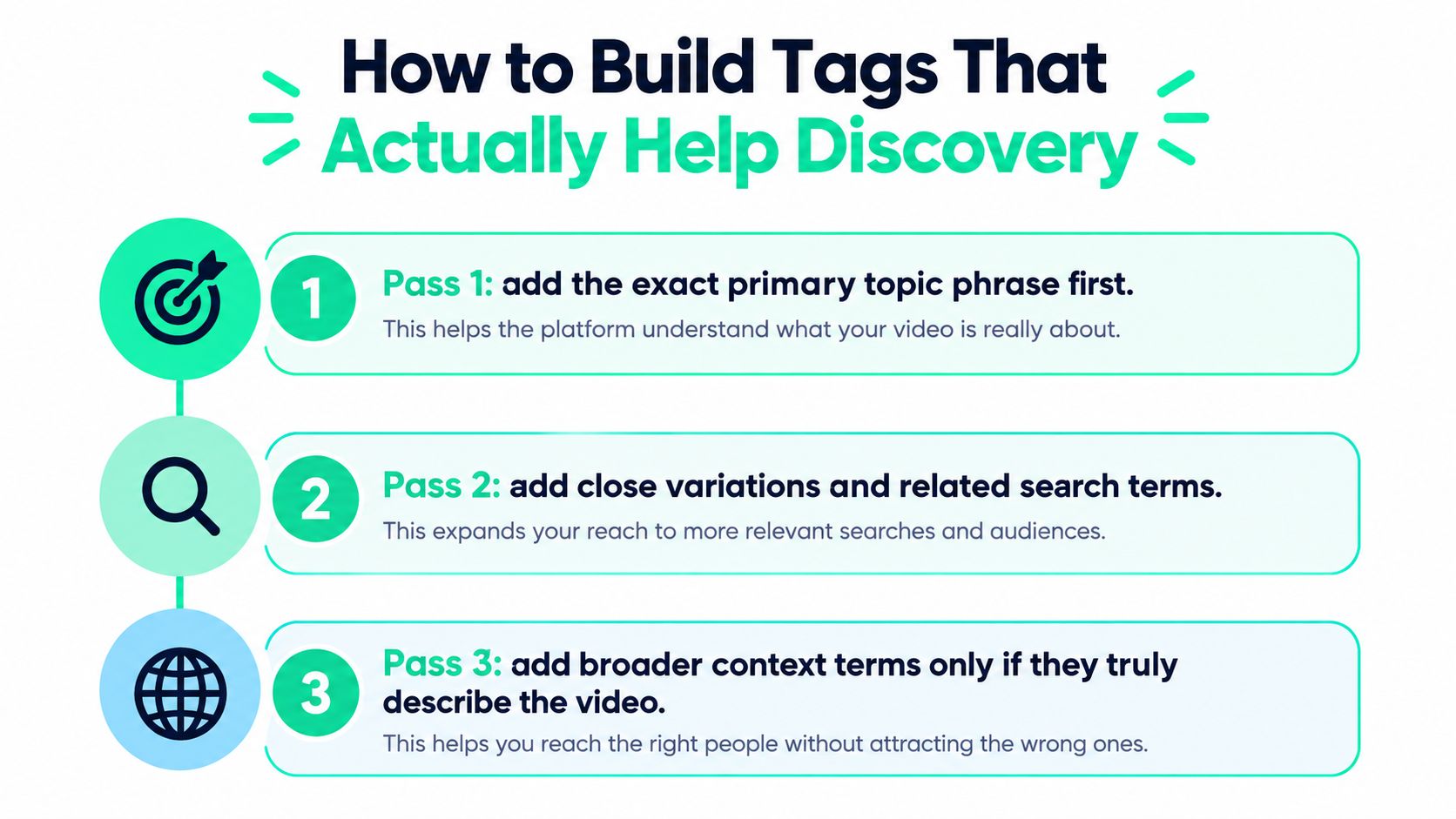
Pass two, capture real variations
Now add legitimate spelling errors, abbreviations, acronyms, and transliterations that viewers might enter. A collection name with unusual spelling deserves more attention here than a generic category term. If the brand uses an established abbreviation, include it. If the product name is commonly mistyped, include the likely error.
This is especially useful for names that cross languages or use unfamiliar terms. The variation must still refer to the same subject. Don't manufacture random misspellings just to make the list look larger.
Creators producing educational formats can also review an explainer video creator guide when the topic involves a named process, tool, or technical term that viewers may spell in several ways.
Pass three, remove the noise
Delete tags that are adjacent, sensational, or absent from the video. The final list should agree with four visible or audible signals:
- Spoken content: The video discusses the subject.
- Title: The title makes a promise the video fulfills.
- Thumbnail: The visual packaging doesn't imply a different topic.
- Description: The written context supports the same interpretation.
Quality control beats quantity. A short, accurate tag set is more useful than a stuffed field full of terms the video never addresses.
Don't use metadata tags to compensate for a weak thumbnail or vague title. If the video targets search intent, improve the explanation, packaging, and opening before spending more time on tags. For additional context on metadata rather than hashtags or products, see this overview of YouTube SEO tags.
Product Tags Versus Metadata Tags, What Creators Need to Know
Treat metadata tags and Shopping product tags as separate tools. Their management areas, useful applications, and reporting signals differ, so combining them creates poor decisions.
| Area | Metadata tags | Shopping product tags |
|---|---|---|
| Where creators manage them | The Tags field in video details | Product-tagging controls in the upload or mobile flow |
| What viewers get | Context that clarifies the video | A direct way to inspect or shop featured products |
| Primary measurement | Impressions, search traffic, click-through rate, and retention | Product impressions, clicks, and attributed sales |
| Best use | Names, acronyms, misspellings, and precise topic variants | Products visibly demonstrated or materially discussed |
Metadata tags add context to a video. They do not connect viewers to a storefront. Product tags connect a featured item to a shopping path, but they do not replace the title, description, or search metadata. A merch creator can add a collection name and legitimate spelling variants to the metadata field, then tag the exact garment shown in the video.
Product tagging requires a stricter selection process
YouTube's Shopping documentation says creators can tag products across videos, Shorts, and livestreams. Eligibility depends on the creator, channel, market, and program requirements. The current Shopping expansion includes eligible YouTube Partner Program creators with at least 500 subscribers, as described in YouTube's Shopping expansion announcement.
YouTube states that creators can tag up to 60 products in a video. That limit is not a target. Tagging every item in a store can make the selection noisy and reduce trust. Choose the product visible on screen, the item examined in the review, or the garment that anchors the drop.
On mobile, select Tag products, search for the eligible listing, and choose the matching item. Check the product identity and variant before publishing. If the catalog changes later, review the association instead of assuming the original selection remains accurate.
Choose based on the business outcome
Use metadata tags to resolve a naming or topic ambiguity. Use Shopping tags to reduce the distance between a demonstrated product and a purchase.
For a deeper look at the metadata side, see this overview of YouTube metadata tags. A creator reviewing one sweatshirt could add its exact name and legitimate spelling variants to the metadata field. The creator could also tag that specific sweatshirt as a product, then assess product clicks and sales separately from search performance.
That separation keeps the decision tied to the intended result. Evaluate metadata changes with search and viewing signals, and evaluate product tags with shopping actions.
Measuring Tag Performance and What to Optimize Next
Tags only matter when you measure the outcome they are meant to influence. Metadata tags and product tags belong to separate measurement tracks because one clarifies a video for search, while the other creates a path to purchase.
Measure metadata as supporting context
Set a baseline before changing ordinary video tags. Review impressions, search traffic, click-through rate, and retention alongside the title, thumbnail, and description. A performance change after editing metadata does not prove that tags caused it. Packaging, topic demand, recommendations, and viewer satisfaction can all affect the result.
Change one variable at a time where practical. Replacing the title, thumbnail, description, and tags together removes your ability to identify the effective change. YouTube does not publish a universal success benchmark for ordinary tags, so do not promise a standard ranking lift or conversion result.
Ask four questions:
- Did search impressions change?
- Did search traffic become more relevant?
- Did viewers click and continue watching?
- Does the revised metadata accurately describe the video?
If the answers stay weak, revise the title, thumbnail, opening, or content quality before adding more keywords. Tags can resolve ambiguity, but they rarely compensate for weak packaging or an unconvincing video.
Measure Shopping as a commerce funnel
Product tags offer clearer commercial checkpoints. Where available, review product impressions, product clicks, and attributed sales in YouTube Analytics. YouTube positions this reporting as a way to connect tagged-product engagement with visits to product pages, giving creators a measurable route from content to shopping.
Compare the products viewers notice with the products they click. If one featured garment draws attention while another receives stronger shopping interest, adjust future placement and selection. Put the stronger conversion candidate at the most natural point in the video, and keep the product association visible without interrupting the content.
YouTube reported that Shopping tags generated more than twice as many product clicks as links in video descriptions. It also reported more than 1.3 million creators participating in its affiliate program and gross merchandise volume growing 13 times over a two-year period. The YouTube Shopping announcement provides the platform's figures.
Measure the path, not the label. A metadata tag clarifies a video. A product tag earns its place through shopping behavior.
Creators and merch teams connecting YouTube content with physical products can evaluate FLYP LTD, which provides creator merch workflows, storefronts, zero-inventory production, fulfillment, and YouTube Shopping integration for eligible channels.
Stop stuffing the Tags field. Run a two-track workflow: precise metadata for disambiguation and product tags for measurable commerce. Visit FLYP LTD to connect eligible YouTube Shopping content with branded merchandise, then use product clicks and attributed sales to decide which designs and placements deserve the next drop.